AI workout planner
Your week of training,
planned in a minute.
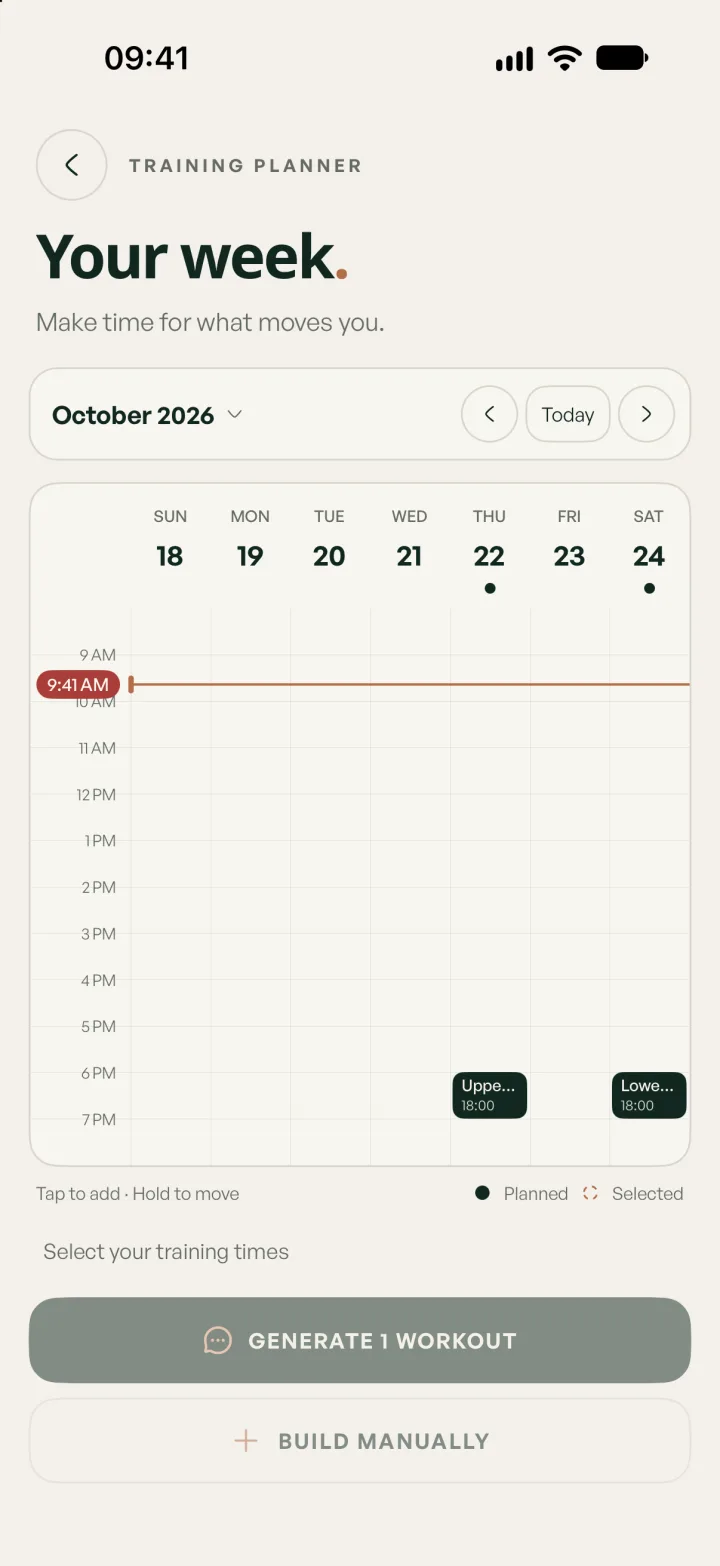
Tap the slots you can train this week. Lifterly builds each session from your goal, your equipment, your experience and what you lifted last time, then puts it in your calendar. You check every exercise and weight before you start.
Start for free. Build from there.
- Sessions sized to the time you have
- 30–120 min
- Training styles, from full body to Arnold split
- 6
- Exercises, each with a demo video
- 241
How it works
Three steps.
Then you train.
- 01
Tell it how you train
Your goal (muscle, strength, fat loss or endurance), your experience, the equipment you have and how often you want to train. You answer once, during onboarding.
- 02
Pick your slots
Tap the days and times that work in the week view, then choose a training style and how long each session can last.
- 03
Review, then lift
Your sessions appear with exercises, sets, reps, weights and rest. Change anything you like, then start the workout when the time comes.
Starting weights
Built from what you actually lifted.
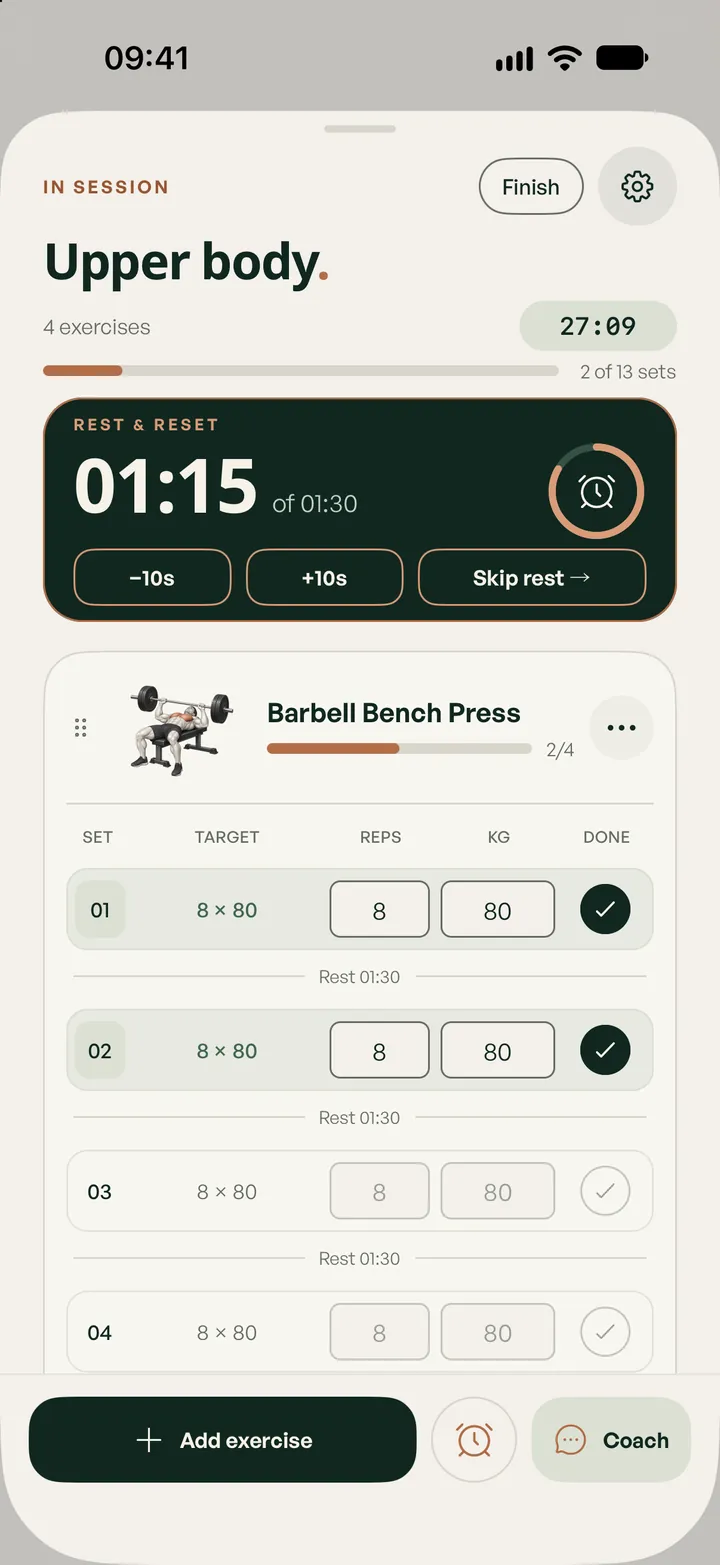
A template doesn’t know that you benched 80 kg for eight last Thursday. Lifterly does. The planner reads your recent sessions and your results on each exercise, and sets targets a small step above what you last managed, never a risky jump.
It also looks at what you trained recently, so the week stays balanced instead of repeating the same session. Without history yet, it picks conservative weights for your level and refines them as you log.
- Weights per dumbbell for dumbbell work, in kg or lb
- Rest fitted to the effort: longer after heavy compounds, shorter for isolation work
- Exercises you marked “Don’t recommend” never come back
Your goal decides the shape
Heavier for strength. Denser for fat loss.
The goal you choose changes the whole session. Strength favours compound lifts with lower reps and heavier loads. Muscle gain mixes compounds and accessories in the 6–12 rep range. Fat loss builds efficient, denser sessions. Endurance uses stable movements with high reps or timed sets.
Your level matters too: beginners get conservative loads and the focus is on execution; advanced lifters get sessions that are challenging but stay safe. Every set fits the session length you picked, counting both the time under the bar and the rests.
Still your plan
Change anything. Or plan it all yourself.
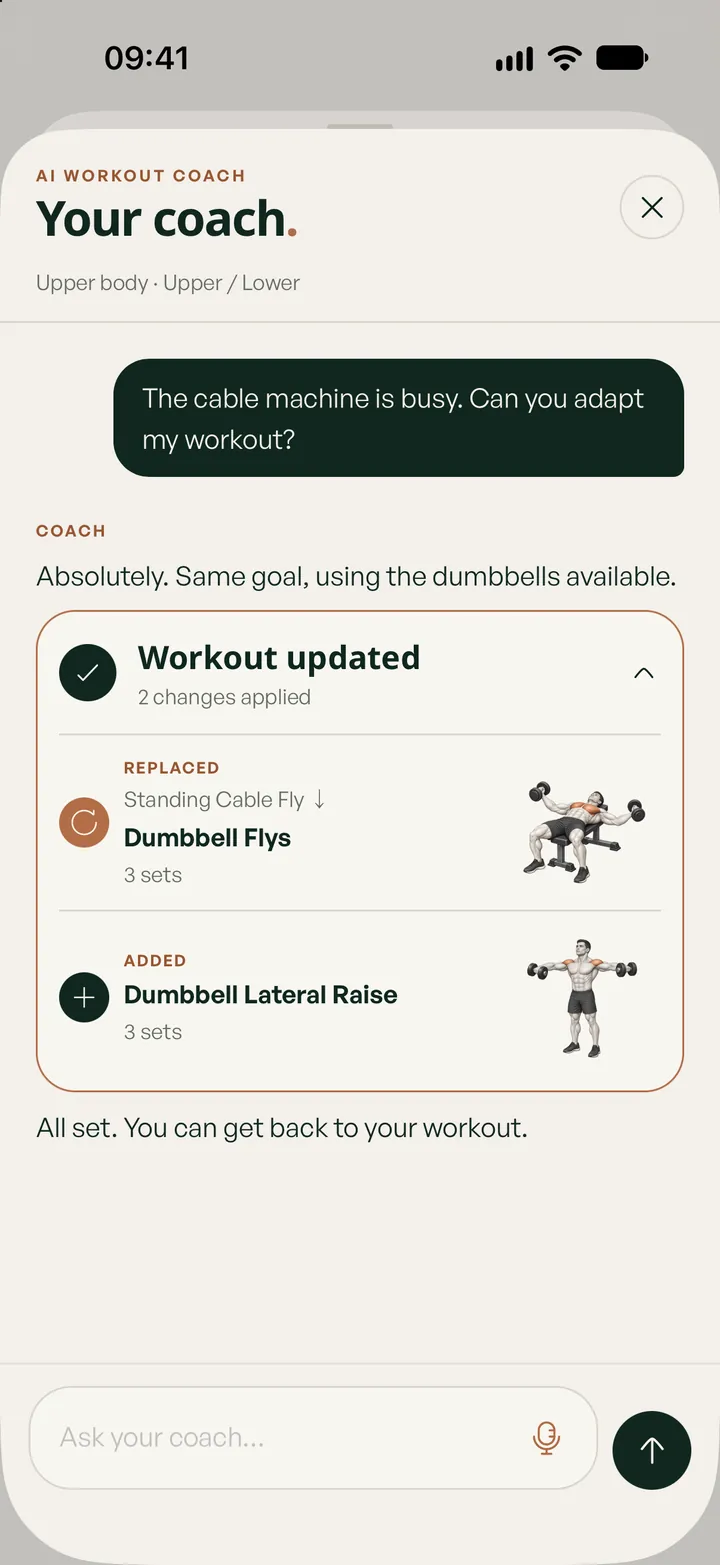
Every planned session stays editable: swap an exercise, add a set, change a weight, or hold a session to move it to another day. If the machine is taken in the middle of a workout, the AI coach suggests an alternative that fits your equipment.
Prefer to write your own program? Build sessions by hand from the exercise library and plan them on your week for free. The AI is there when you want it, not in your way.
Free and Pro
Plan for free.
Let AI plan with Pro.
Logging, planning by hand and Apple Watch tracking stay free. Pro adds everything the AI does for you.
Free
- Plan any day of your week by hand
- All six training styles and 241 exercises with demos
- Log every set, with rest timers and history
- Apple Watch tracking
Lifterly Pro
- AI-generated sessions and full weeks
- Weights and reps set from your recent results
- The AI coach, mid-workout swaps included
- Performance and body ratings
Questions
A few things worth knowing.
Is Lifterly’s workout planner free?
Planning is free: you can build sessions yourself and place them on any day of your week. Generating sessions or whole weeks with AI is part of Lifterly Pro. You’ll find the current plans in the app.
What does the AI use to plan my workouts?
Your goal, experience level, equipment and weekly frequency from onboarding, the training style and session length you choose, and your recent workouts and results. To do it, Lifterly sends that data to its AI provider (OpenAI), only after you agree; you can turn it off in Settings.
Does the planner apply progressive overload?
Yes, gradually. Target weights start from what you last managed on each exercise and move a small step up, so the load follows your actual progress. You can always adjust a target before or during the session.
Which training splits can it plan?
Full body, push/pull/legs, upper/lower, Arnold split and the classic body-part split, plus custom sessions. Not sure which one fits your week? Try the training split generator.
Can I train without a gym?
Yes. Select only the equipment you have, or bodyweight only, and the planner chooses exercises you can actually do at home.
Keep exploring.
- AI personal trainer
A coach that knows your training
Ask mid-workout, by voice or text: the AI coach reads your session and history, and changes the plan for you.
Read more - Split generator
Training split generator
Your days, goal, level and time in; a full week of sessions out, with weekly sets per muscle.
Read more - Push/pull/legs
Push/pull/legs, 6 days
The classic PPL split, run twice a week: a heavier day and a volume day for each pattern.
Read more