Apple Watch workout tracker
Leave your phone
on the bench.
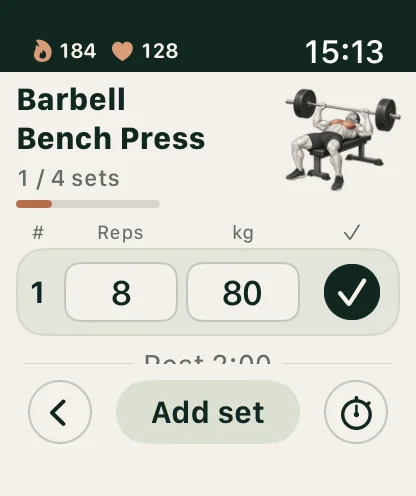
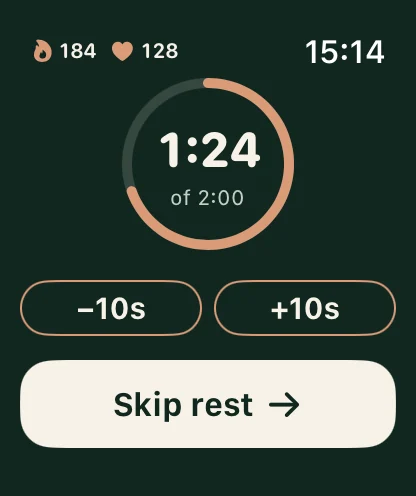
Lifterly on Apple Watch shows the exercise you’re on, lets you complete a set or fix its weight with the Digital Crown, and runs your rest countdown on your wrist, with your heart rate and calories beside it. Your iPhone keeps the session; your Watch keeps you in it. Free for everyone.
Start for free. Build from there.
- Watch tracking is included, no Pro needed
- Free
- Heart rate, calories and rest on your wrist
- Live
How it works
Start on iPhone.
Stay on your wrist.
- 01
Start the session
Open a planned workout on your iPhone and start it. Your Watch picks it up, with every exercise and target.
- 02
Log at the bar
Mark a set done, change its reps or weight with the Digital Crown, add a set, or check an exercise’s instructions.
- 03
Rest, then go
The countdown starts after each set. Add or remove ten seconds, or skip it. Swipe across to your music without stopping it.
In sync
One session, on both screens.
Whatever you log on your Watch appears on your iPhone at once, and the other way round. Your phone runs the workout, so the two never disagree; keep the Lifterly app open on it while you train.
If you allow it, Lifterly records the session as a strength workout in Apple Health, with heart rate and active calories. It’s optional: the Watch follows your workout either way.
- Exercise illustrations stored on the Watch, so they appear instantly
- Always On support on compatible models
- A Now Playing page next to your rest timer
- Kilograms or pounds, like on your phone
Questions
A few things worth knowing.
Is Lifterly’s Apple Watch app free?
Yes. Apple Watch tracking is included for everyone, without Lifterly Pro.
Can I use the Watch app without my iPhone?
No. The Watch follows the workout running on your iPhone, which needs to be nearby with Lifterly open. Your sets, weights and rest stay in sync between the two.
Does it save my workouts to Apple Health?
If you allow it, yes: each session is recorded as a strength training workout with heart rate and active calories. You can decline and still use the Watch app.
Which Apple Watch do I need?
Any Apple Watch running watchOS 10 or later, paired with an iPhone running iOS 16.4 or later.
Keep exploring.
- Workout tracker
A gym log that stays out of your way
Log sets in a tap, rest on a timer, and see every lift’s history. Free, with no limit on workouts.
Read more - Upper/lower
Upper/lower, 4 days
Two upper and two lower sessions a week: a strength day and a volume day for each half of the body.
Read more - 1RM calculator
One-rep max calculator
Estimate your max from any set of up to 12 reps, with a percentage chart for your next block.
Read more