Coming soon · Lifterly in ChatGPT
Plan your training
in ChatGPT.
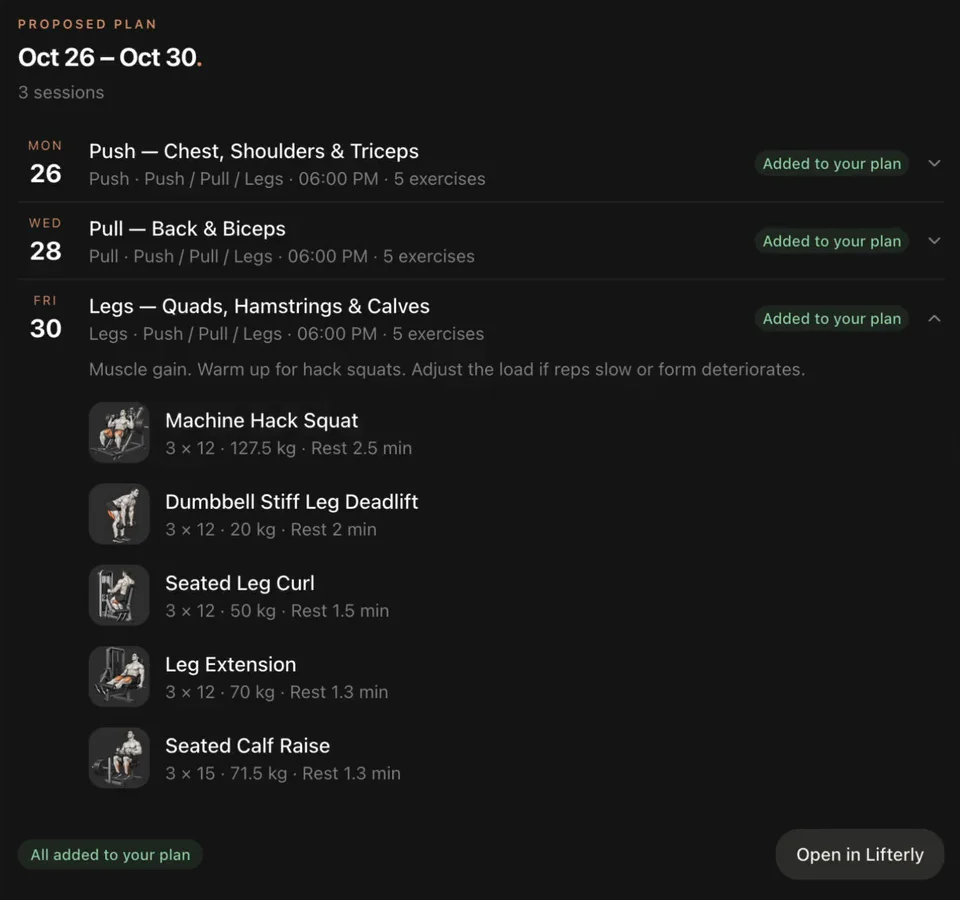
Ask ChatGPT for a training week around what you already have planned, a 45-minute session for tonight, or an honest look at the last four weeks. With Lifterly connected, it answers from your own goal, equipment and history, shows the plan in a card, and adds it to your app when you say so.
Lifterly is in review for ChatGPT’s plugin directory. Get the app and set up your account now to be ready on day one.
- Things to ask: plan, build, log, swap, review
- 5
- Account: the same plan and history as the app
- 1
- Changes saved before you agree
- 0
How it works
Connect once.
Then just ask.
- 01
Set up Lifterly on your phone
Get the app for iPhone, create your profile, then link Apple, Google or an email in Settings. ChatGPT signs in with that account.
- 02
Connect it in ChatGPT
When Lifterly reaches ChatGPT’s plugin directory, add it and sign in. You choose whether ChatGPT can only read your training, or change your plan too.
- 03
Ask in plain words
“Plan my week: Monday, Wednesday and Friday at 6 pm.” ChatGPT proposes the sessions in a card, and adds them to your plan once you agree.
What you can ask
Five things it does well.
Lifterly in ChatGPT knows your training profile, your planned sessions, your workout history and the app’s whole exercise catalogue. That is enough for the conversations that usually take a coach:
- Plan the next days, a week, a month or a program, around what is already planned
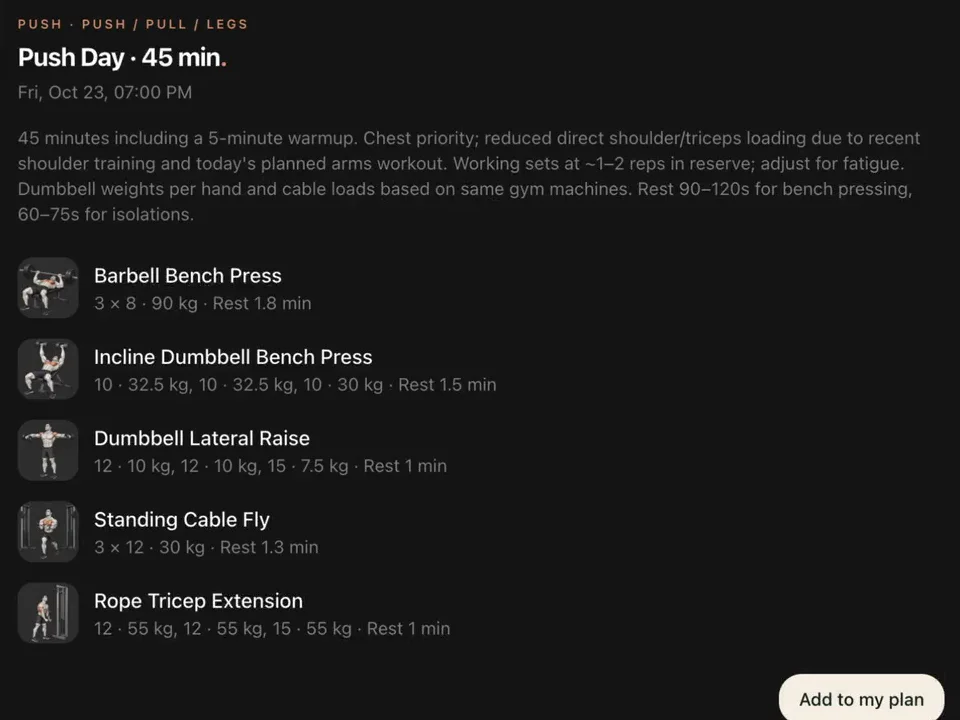
- Build one session for the time you have, shown as a card before it’s added
- Log a workout you did without the app: “5×5 squats at 100 kg this morning”
- Swap an exercise in a planned session, and ban it if you never want it again
- Review your consistency, records and plateaus, with a chart for a lift
Back in the app
Ask on your laptop. Train with your phone.
Sessions you add in ChatGPT go straight into your Lifterly plan, and workouts you log there join your history. Your phone is told about the change and updates itself, so the session is waiting when you open the app at the gym, on iPhone and on Apple Watch.
The cards open each exercise’s guide too, with its demo video, the muscles it works and step-by-step instructions, the same as in the exercise library.
Your data, your call
Nothing changes without you.
ChatGPT shows every proposed session before saving it, and asks before logging a workout or banning an exercise. Reading your training and changing your plan are two separate permissions, and you can disconnect Lifterly at any time.
It suggests training, not medical advice: it leaves out exercises you say hurt and recommends seeing a professional for pain. It can’t delete your account, reach other people’s data, or track nutrition or body measurements.
Questions
A few things worth knowing.
Do I need the Lifterly app to use it in ChatGPT?
Yes. ChatGPT works with your Lifterly account: create your profile in the app first, then link Apple, Google or an email in the app’s Settings, so ChatGPT can sign in with it.
Will sessions planned in ChatGPT show up in the app?
Yes. They’re added to your Lifterly plan and your phone updates itself, so you can start them from the app or your Apple Watch.
Can ChatGPT change my plan without asking?
No. It shows proposed sessions in a card and saves them only once you agree or press the card’s button. Changing your plan also needs a separate permission from reading it.
When will Lifterly be available in ChatGPT?
Lifterly is in review for ChatGPT’s plugin directory. This page will say so as soon as it’s live; meanwhile, plan your training with the AI workout planner in the app.
Keep exploring.
- AI workout planner
Plan your week in a minute
Pick your training slots; Lifterly builds each session from your goal, equipment and last results.
Read more - AI personal trainer
A coach that knows your training
Ask mid-workout, by voice or text: the AI coach reads your session and history, and changes the plan for you.
Read more - Workout tracker
A gym log that stays out of your way
Log sets in a tap, rest on a timer, and see every lift’s history. Free, with no limit on workouts.
Read more